
Git pull request: publish into your repository
Connect a GitHub repository to open a pull request with the rendered page for your team to review and merge.
The Git connector turns each published Framesite page into a GitHub pull request. It creates a new branch with a committed static HTML file of the page, with the structured data embedded in its head, and opens a PR for your team to review and merge. It authenticates with a GitHub token.
What you need
A GitHub token with contents and pull-request write permission on the target repository, and the repository named in owner/name form. Optionally set a base branch, which defaults to main, and a path prefix for the committed file, which defaults to framesite. Create a fine-grained personal access token or an equivalent in your GitHub settings, scoped to the repo. Connecting requires a workspace admin.
Connecting Git
Open the Git pull request card
In Framesite, open Settings, then Destinations & connections, and find the Git pull request card. Connecting destinations is limited to workspace admins.
Enter your repository details
Provide the GitHub token, the repo in owner/name form, and, if you want to change the defaults, the base branch and path prefix.
In Framesite- Settings
- Destinations & connections
- Git pull request
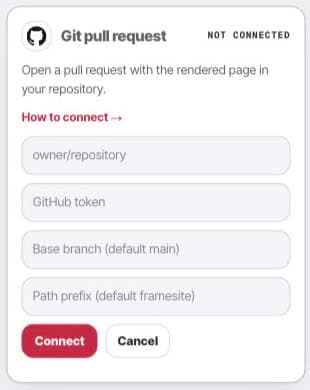
Open the Git setup card to choose the repository path where Framesite will open a pull request. Save the connection
The token is stored encrypted in our vault and is never displayed again.
What it does
Each publish opens a new pull request. Framesite creates a new branch, commits a static HTML file of the page with its structured data embedded in the head, and opens the PR against your base branch. Every publish opens its own pull request by design, so nothing merges automatically; your team reviews and merges each one.
Troubleshooting
- The connect button says denied. Connecting is limited to workspace admins. Ask a workspace admin to connect, or to make you an admin.
- The pull request cannot be opened. The base branch must already exist in the repo. Confirm the branch name, and that the token has contents and pull-request write.
- The token is rejected. Check that the token grants access to the exact owner/name repository and has not expired.
Removing the connection
Open the Git pull request card and click Disconnect. This removes the stored token from our systems immediately and ends all further access. Any pull requests Framesite already opened stay in GitHub for your team to merge or close. Reconnecting later starts from a fresh token.
Common questions
- What does a publish create on GitHub?
- A new pull request. Framesite creates a new branch, commits a static HTML file of the page with its structured data embedded in the head, and opens a PR against your base branch for review.
- Does re-publishing update an existing PR?
- No. Every publish opens its own pull request by design, so each page change arrives as a separate PR your team can review and merge independently.
- What are the base branch and path prefix for?
- The base branch is what the PR targets and defaults to main; it must already exist. The path prefix is the folder the HTML file lands in and defaults to framesite.
- What happens to open PRs if I disconnect?
- Disconnecting removes the stored token so Framesite can no longer reach the repo. Any pull requests already open stay in GitHub for your team to merge or close.