
BigCommerce: catalog truth and product schema
Connect BigCommerce with a store API token to ground product matches and write a video's schema into a product metafield.
The BigCommerce connector links your store to Framesite so product matches are grounded in your real catalog, and so a video's structured data can be written back into the product page for search and AI engines. Write-back is opt-in and off by default, because writing to a live store is a real change.
What you need
- Your Store Hash.
- An API access token created in BigCommerce (Settings, then API accounts) with the Products scope set to modify. A read-only token can read the catalog but is refused for schema write-back.
- A workspace admin to connect the store.
Connecting BigCommerce
Create the API account in BigCommerce
In BigCommerce, open Settings, then API accounts, and create a token with the Products scope set to modify. Note your Store Hash. A read-only token can read the catalog but is refused for schema write-back.
Open the commerce connection panel
In Framesite, open the commerce connection panel. You need a workspace admin role to connect the store.
Enter store hash and token
Enter your Store Hash and API access token. Framesite validates them against your store before saving, and stores the token encrypted, used only on our servers and never shown back to you.
In Framesite- Settings
- Destinations & connections
- BigCommerce catalog
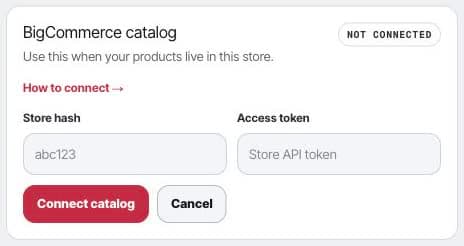
Open the BigCommerce catalog card to connect the product source Framesite should read and enrich.
What it does
The BigCommerce connection works two ways: it reads your catalog to ground product matches, and it can write a video's structured data back into the product page.
- Read. Framesite pulls your full product catalog, which is SKU-authoritative, so product matches are grounded in real store data.
- Write.Framesite can write a video's structured data into a product metafield (namespace framesite, key video_schema) that a one-time theme snippet renders server-side, so the product page carries the schema for search and AI engines. Write-back is opt-in and off by default, de-duplicated so unchanged pages are skipped, and if several pages fail you get a notification, usually a token-scope problem.
Troubleshooting
- Write-back returns a 403. The token is missing the Products-modify scope. Create or update the token in BigCommerce with the Products scope set to modify, then reconnect.
- The schema is not rendering. The theme snippet must be installed once for the schema to render on the product page. Install it, then the written metafields render server-side.
- Several pages failed on write-back. You get a notification when this happens; it is usually a token-scope problem. Check that the token has the Products scope set to modify.
Removing the connection
Disconnect removes the stored token. The store hash is kept as metadata, and metafields already written stay on your products until you remove them. Reconnecting later validates a fresh token against your store before saving.
Common questions
- Does BigCommerce use OAuth?
- No. The BigCommerce connection uses a store API token, not OAuth. You create a token in BigCommerce under Settings, then API accounts, and enter it in Framesite along with your Store Hash.
- Does connecting change my live store?
- Not on its own. Reading the catalog changes nothing. Schema write-back is opt-in and off by default, because writing to a live store is a real change. When on, it is de-duplicated so unchanged pages are skipped.
- Why did a write-back fail with a 403?
- A 403 on write-back means the token is missing the Products-modify scope. Create or update the token in BigCommerce with the Products scope set to modify, then reconnect. If several pages fail, you get a notification.
- What happens to my data if I disconnect?
- Disconnecting removes the stored token. The store hash is kept as metadata, and any metafields already written stay on your products until you remove them.