
GoHighLevel: publish and read your Location
GoHighLevel is coming soon. See its current availability and the planned Location-level publishing and read flow.
The GoHighLevel connector links a HighLevel Location to Framesite so approved pages can be published as blog posts and Framesite can ground its work in that Location's real data. Anything Framesite publishes is created as a draft and never goes live without your client approving it.
What you need
- A HighLevel sub-account (Location).
- A blog in that Location that already has an author and a category set up (Sites, then Blogs), or posts are refused.
- A featured image on every page you push, which is required.
- A workspace admin to connect the account.
Connecting GoHighLevel
Open Destinations & connections
Sign in to Framesite, open Settings, then Destinations & connections. The GoHighLevel card sits with the other destinations. You need a workspace admin role to connect accounts.
In Framesite- Settings
- Destinations & connections
- GoHighLevel
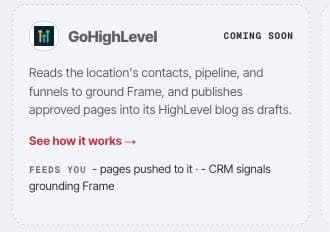
The GoHighLevel card shows its current availability directly in Destinations & connections. Click Connect GoHighLevel
You are sent to HighLevel's choose a location consent screen. It connects at the Location level; agency or company-level tokens are refused. Framesite never sees your HighLevel password.
Choose a Location and return
Pick the Location you want to connect and approve. HighLevel sends you back to Framesite, the card shows Connected, and an encrypted token is stored, used only on our servers and never shown back to you.
What it does
The GoHighLevel connection works two ways: it writes blog posts you approve, and it reads your Location data to ground Framesite's understanding of your business.
- Write.Framesite can publish an approved page as a blog post. New posts are drafts, and when Framesite updates an existing post it preserves that post's current status, so a live post stays live. Website and funnel page content write-back is not offered, because HighLevel's public API does not support it.
- Read.Framesite reads the Location's contacts, opportunities, funnels, and blog posts to ground its understanding of your business. Nothing from the CRM is published.
Troubleshooting
- The connect button says denied. Connecting is limited to workspace admins. Ask a workspace admin to connect, or to make you an admin.
- The connection is refused. You must connect a Location, not an agency. Agency or company-level tokens are refused; choose a Location when HighLevel asks.
- Posts are refused. The blog needs an author and a category set up first (Sites, then Blogs). Add both, then try again.
- A page will not push. Every pushed page needs a featured image. Add one to the page and push again.
Removing the connection
Open the GoHighLevel card and click Disconnect. This deletes the stored token from our systems immediately and stops all further access. Posts you already created stay in HighLevel, because they are your content there. Reconnecting later starts a fresh authorization from the beginning.
Common questions
- Do I connect an agency or a single location?
- A single Location. Framesite connects at the Location (sub-account) level. Agency or company-level tokens are refused, so choose the Location you want when HighLevel asks.
- Will publishing take a live post down?
- No. New posts are created as drafts. When Framesite updates an existing post it preserves that post's current status, so a live post stays live and a draft stays a draft.
- Can Framesite update my website or funnel pages?
- No. Website and funnel page content write-back is not offered, because HighLevel's public API does not support it. Framesite publishes to your Location's blog and reads your Location data to ground its work.
- Why does the GoHighLevel card say coming soon?
- The GoHighLevel connector is pending the provider's app approval. Until it is approved, it may show as coming soon in your workspace. Once approved, the card becomes connectable for workspace admins.
- What happens to my data if I disconnect?
- Disconnecting deletes the stored token from our systems immediately and stops all further access. Posts you already created stay in HighLevel, because they are your content there.